UNSW Making

Advanced CNC Milling: Machinist essentials

Part design


Essential content

Vibration


Essential content

Bad work holding

  • Avoid having excessive stock stickout
  • Ensure there is minimum 3mm stock in the vice
  • clean everything well to avoid getting chips between the part and the vice
  • Sometimes

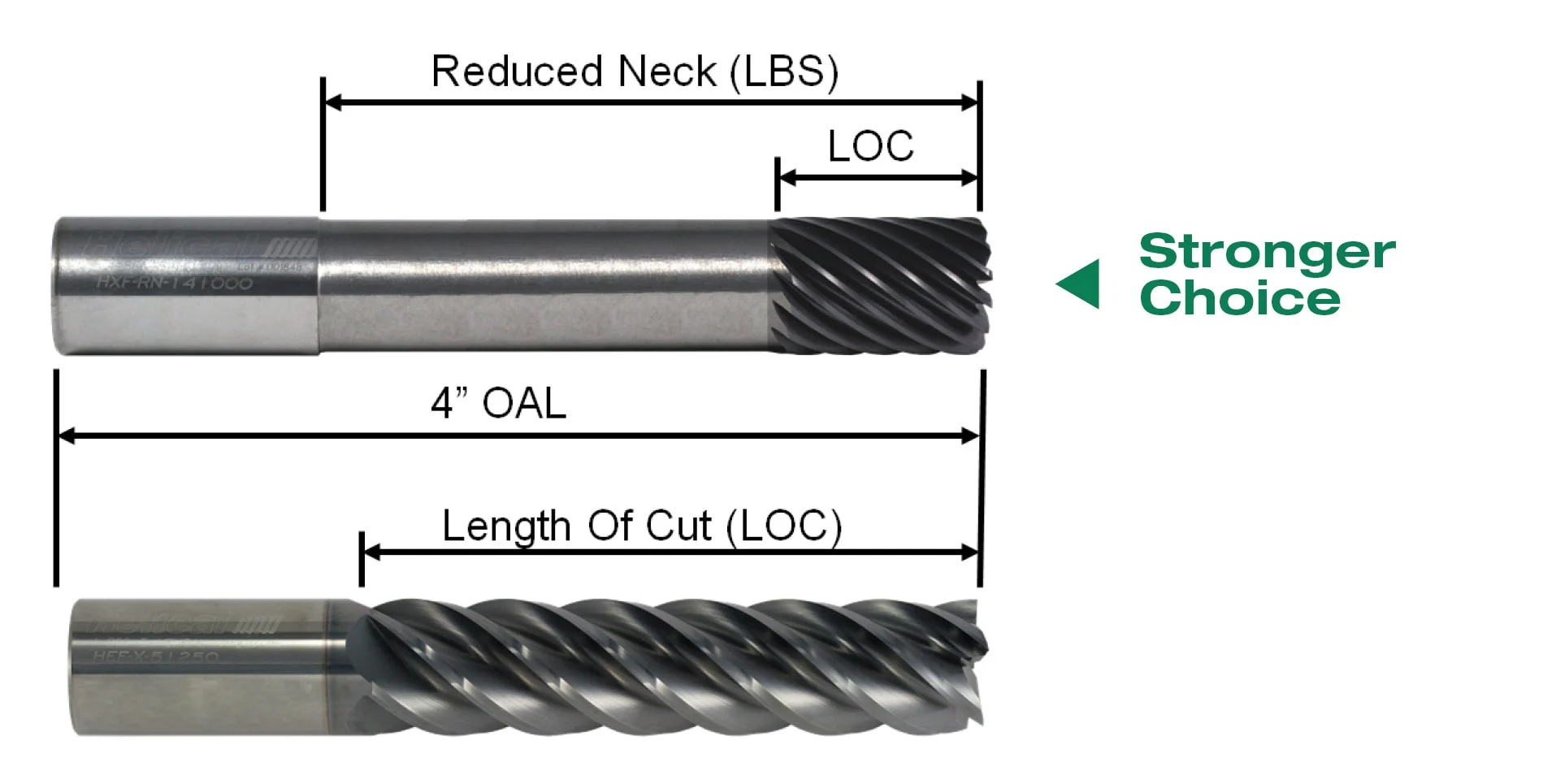
Long tools

  • The rigidity of the tool is proportional to the diameter to the power of 4 and the stickout to the power of 3. So doubling the tool diameter increases rigidity by 16 times and halving the stickout increases the rigidity by 8 times
  • Try to use the shortest possible tool and holder for the job to minimize vibration
  • If you need a long tool try to use the biggest size possible
  • Higher flute count also makes tools more rigid because there is less material removed
  • There are fancy tools with variable helix angles that can help avoid resonance

Excessive tool engagement

  • Less stepover reduces cutting pressure.
  • Adaptive clearing can reduce (but doesn't eliminate) sudden spikes in tool angular engagement.
  • Use "feed optimization" setting to slow the feed rate on corners. See the advanced feed and speeds module for more information.
  • If there is vibration due to excessive tool engagement it is much better to reduce the stepover than the feed, because reducing feed can cause rubbing.
white space Advanced CNC milling

Runout

Runout is a measurement of how concentric the tool is with the spindle center of rotation. It can be measured (in microns) with a dial indicator.

Runout is especially dangerous when cutting small chip thicknesses because it changes the amount of material each flute removes. This can overload one cutting edge and cause wear or breakage.

Rubbing

Rubbing happens when the cutting tries to cut a chip thickness so small that it rubs against the material instead of cutting. Rubbing can be fixed by increasing the feedrate. There is more information on rubbing and chip thickness in the advanced feeds and speeds.

Advanced CNC milling

Bad force distribution

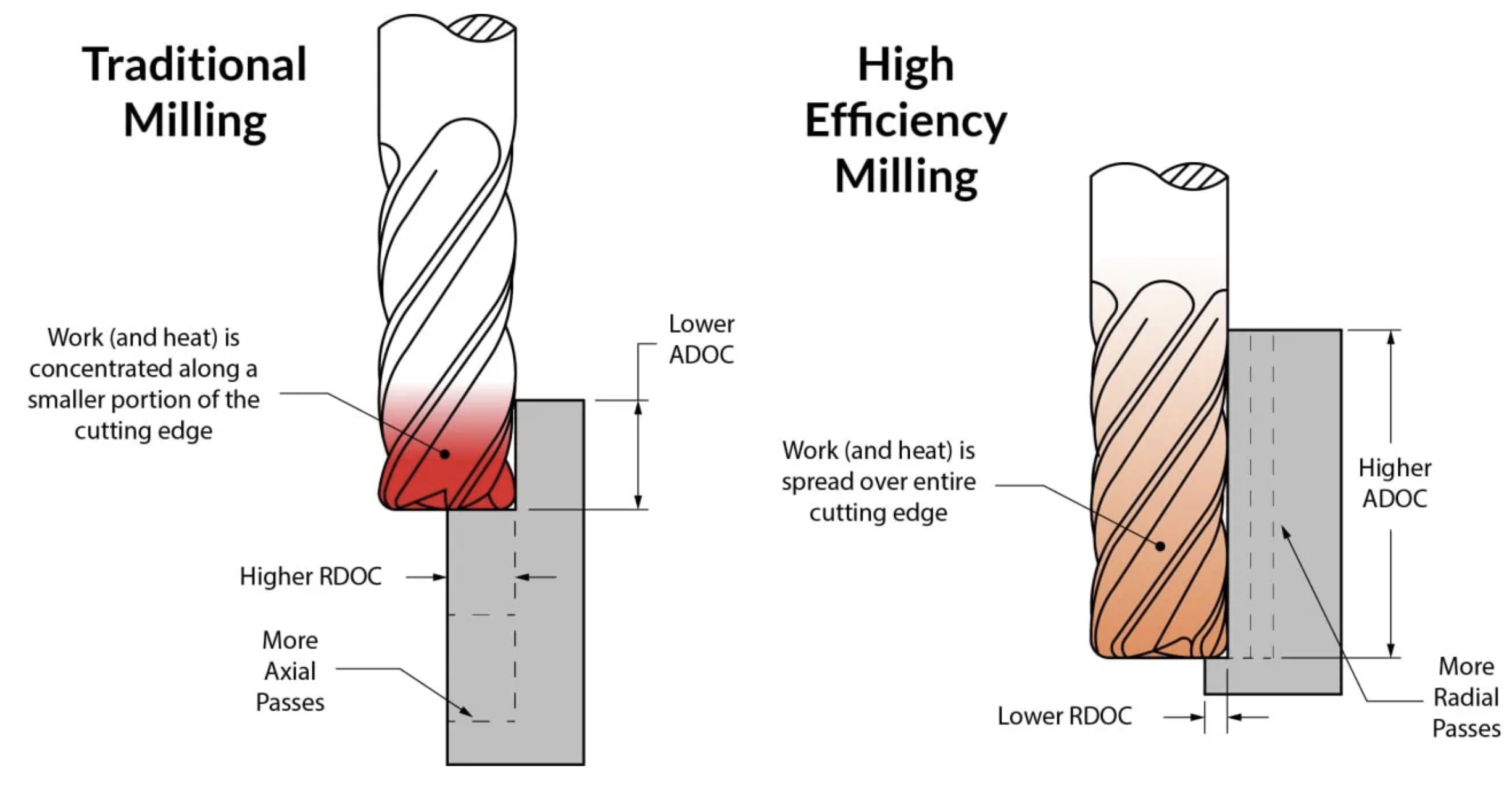
Cutting mainly on the tool tip (traditional milling) causes more deflection than cutting deeper and spreading the load along the whole side of the endmill (high efficiency milling).

Traditional milling versus High efficiency milling

Cut stability (Expert content)

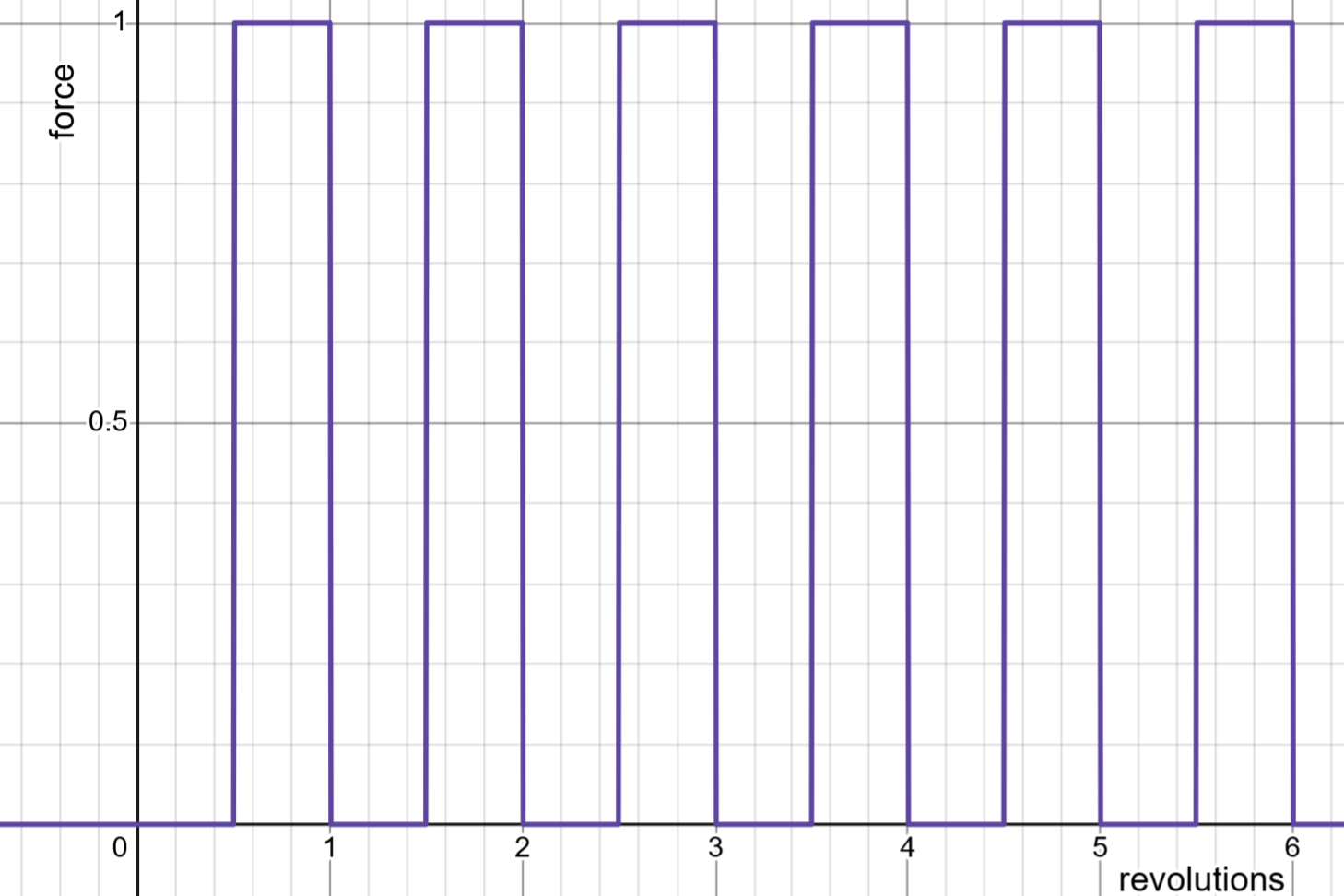
As an endmill rotates the flutes contact the material and while they are in contact the endmill experiences a sideways cutting force. Because the flutes are not always in contact with the material the cutting force will vary through each revolution, causing vibration.

If the cutting force is low and your setup is rigid vibration from bad cut stability is not usually a problem. However if you want nicer surface finish or are experiencing vibration issues it is good to check your cut stability.

Check your cut stability

white space

Bad cut stability

Low depth of cut, large width of cut, single flute endmill: the one flute contacts material 50% of the cut and there is no contact 50% of the cut. The endmill is experiencing periodic force which can cause vibration and possibly resonance.

bad cut stability

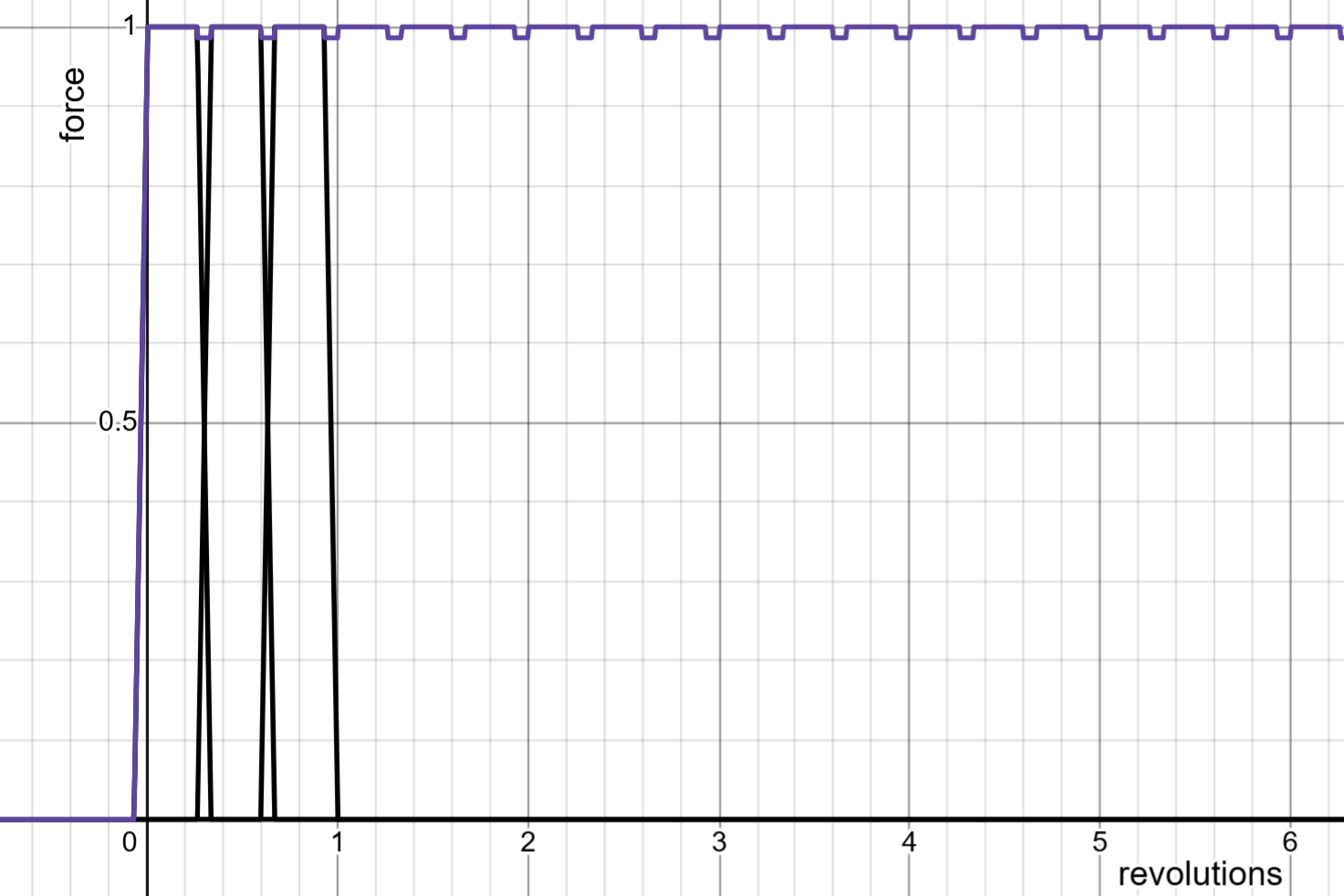
Good cut stability

High depth of cut, small width of cut, three flute endmill. This creates a consistent force on the tool because as one flute comes out of contact with the material the next flute comes into contact. Specific depths and widths of cut can create perfect cut stability (calculator).

good cut stability

Toolpaths


Essential content

Ramping

Tramming a vice


Essential content

Work holding


Expert content

Surface finish


Expert content

Vibration

Vibration is the most important factor for improving surface finish and is discussed in its own section above.

Cut direction

In metal climb creates a better surface finish because it starts cutting at the thickest part of the chip, which avoids rubbing.

Conventional cutting start the cut at the thinnest part of the chip, which means the flute will rub against the material until it reaches a chip thickness where it can start cutting.

However for very soft materials like foam, climb will give a worse surface finishes because can rip extra material out with the chip.

Stepover cusp height

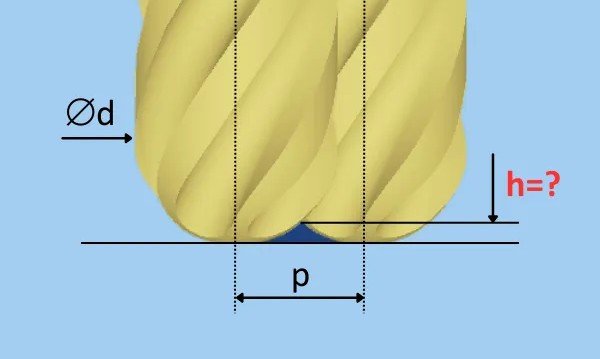
The next most important factor is stepover when doing surface finishing using ball or bull nose endmills. Due to the rounded profile small cusps are left between passes creating surface roughness. Use a cusp height calculator to determine how high these cusps will be.

The best way to reduce the cusp height is to use the largest radius tool possible. You can also reduce the stepover but this will increase the machining time.

Ballnose-get-h

Feed per tooth

The feed per tooth for all tools affects the theoretical surface roughness on vertical walls in exactly the same way as cusp height with ball mills. Between each circular cut there is a uncut cusp of metal. Higher feed per tooth increases the height of the cusp and therefore increases surface roughness.

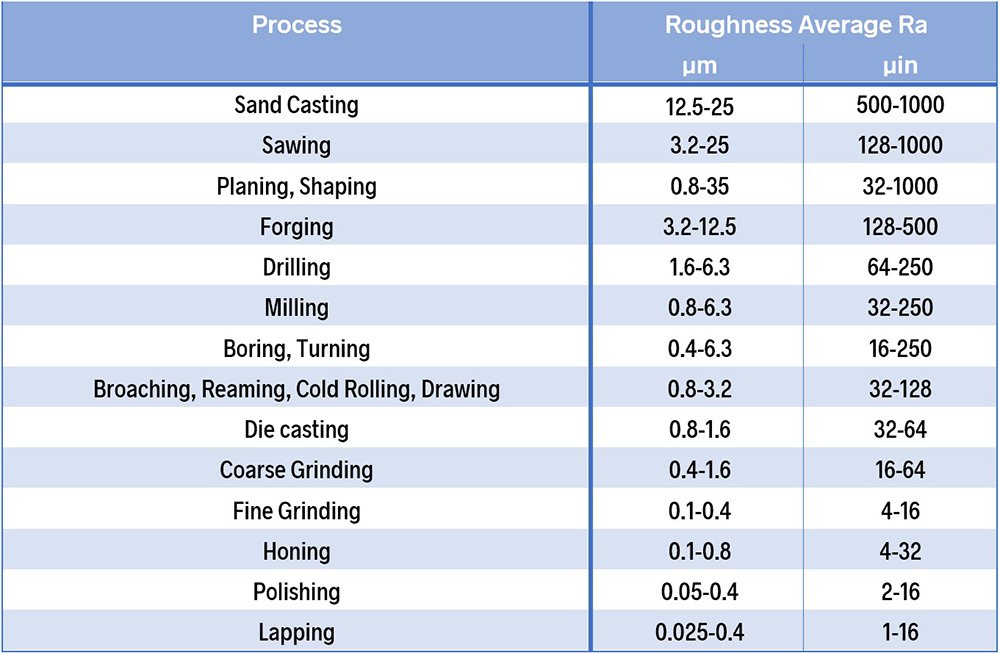
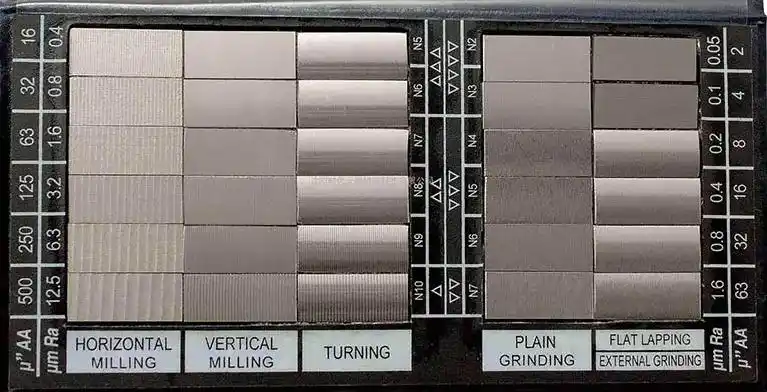
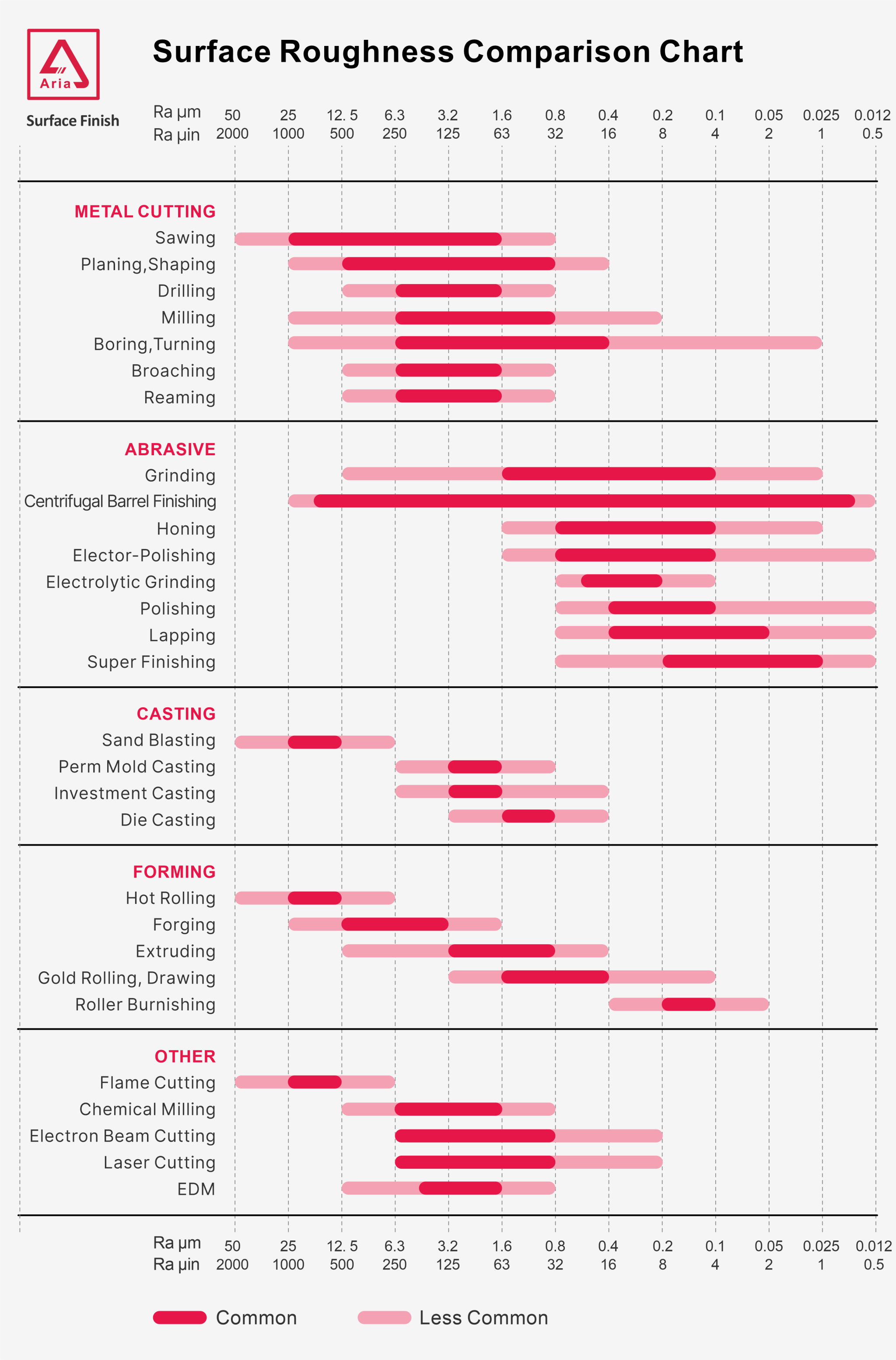
You can use the same calculator to determine feed per tooth cusp height, just enter the feed per tooth where it asks for stepover. However, the theoretical surface roughness from this factor is very small (0.001-0.3 Ra), much smaller than realistic milling surface finishes. This is because bad surface finishes are mostly caused by vibration, not feed per tooth.

michigan_metrology-roughness_average_values

Tool sharpness

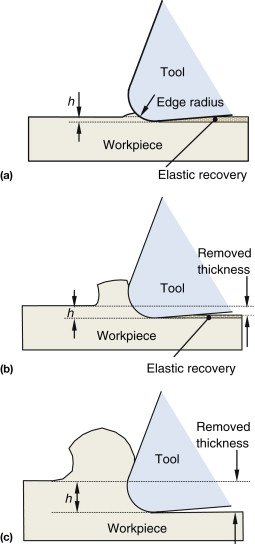
In soft materials (aluminium, brass, plastic...) sharper tools will create a better surface finish.

In hard materials (ferrous, titanium...) sharp edges are too fragile and break or dull quickly, which leaves a worse surface finish. In hard materials it is better to use a coated tool that is less fragile. The coating adds a radius to the cutting edge, so coated tools will always be duller than uncoated tools.

Surface speed

Finding the best surface speed is complex because there are several factors connecting surface speed to surface finish.

Higher surface speed means higher RPM, which can increase the vibration. Reducing the RPM and keeping the same or slightly lower feed per tooth is a great first step to improve surface finish by reducing vibration.

However higher surface speed can make the cut cleaner because the material shears faster and reduces material adhesion to the cutter (built up edge).

Like many things in machining there is an optimal range: too fast increases vibration and heat, and too slow can cause material adhesion to the cutter.

Hitting tolerances


Expert content

No tool cuts what was programmed perfectly: tools bend due to cutting pressure and tool diameter wears over time. In order to hit a desired tolerance you have to measure and account for the errors of your tool.

  1. Roughing: remove all material except for twice the thickness of the finishing stepover.
  2. Test cut: Take a cut identical to the final cut, same stepover, feed per tooth and speed. Leave one finishing stepover stock to leave.
  3. Measure: you can measure manually or use the probe.
  4. Adjust final cut depth: you can manually edit the stock to leave in fusion or update the tool wear in the controller and set the fusion toolpath to wear compensation.
  5. Final cut: if the test cut size was inaccurate the cutting pressure in the final cut will be different to the test cut.
  6. Measure: Always check before you remove the part from the machine.

Example: I want to make a bore between 49.995 and 50.005mm. I will use a 0.5mm finishing stepover. The finishing stepover can't be too small otherwise the difference between the test cut stepover and the final cut stepover can be a large percentage.

  1. Rough all material with 1mm stock to leave. The toolpath is aiming for a 48.000mm bore.
  2. Finishing contour removes 0.5mm and leaves 0.5mm stock. The toolpath is aiming for a 49.000mm bore.
  3. I measure the bore and it is 48.900mm. This means the tool is cutting 0.05mm less than the target.
  4. I program the final toolpath to aim for 50.100mm, so a -0.05mm stock to leave. Or I could enter 0.05mm wear into the controller if using wear offsets.
  5. The final cut removes 0.55mm, which is 10% more stepover than the test cut.
  6. I measure the final bore as 49.996, which is within tolerance but slightly small than the expected 50.000. This is because the final cut had 10% more tool pressure that the test cut.

It is also good practice to measure the bore at multiple depths to check if it tapers. Multiple finishing passes can reduce tapering.

white space

Preparing your stock


Essential content

G-code


Expert content

white space

Using an indicator


Expert content

Tramming the mill


Expert content

Machine base leveling